
English
English


Views: 0 Author: Site Editor Publish Time: 2026-11-26 Origin: Site


Educational technology faces a massive abandonment rate when hardware complexity outpaces a user's cognitive or motor skills. Buyers frequently waste resources on kits that function as glorified remote-control toys with zero educational scalability. Alternatively, they select overly complex platforms that cause immediate frustration and end up collecting dust in a storage room. To avoid these extremes, you need a systematic evaluation framework. Choosing the right STEM robot building kit requires analyzing hardware durability, software ecosystems, and age-appropriate learning curves. You must also consider learner personas and long-term educational viability. This guide provides actionable criteria to match the right robotics platform to the right user. We will break down exactly what to look for so you can ensure sustained engagement and genuine skill development.
Evaluating educational hardware requires establishing clear baseline requirements. A consumer toy operates on closed logic. It performs pre-programmed actions, such as dancing or lighting up, at the push of a button. An effective educational tool demands user input to define its behavior. It requires the user to construct the physical form, wire the electronic components, and write the logic that governs the system. Success is defined by how well the hardware facilitates this transition from passive consumer to active creator.
Understanding the user's creator persona is the first step in hardware selection. Students generally lean toward specific disciplines within robotics. Mechanical tinkerers thrive on structural engineering. They prefer kits heavy on gears, axles, linkages, and structural beams. They want to physically see how torque transfers through a drivetrain. Software-focused coders care less about the chassis and more about the brain. They want a stable platform to test complex algorithms, utilize ultrasonic sensors, and write logic loops. Creative designers focus on the aesthetic and interactive elements, utilizing LED matrices, sound modules, and customizable housings. A successful kit balances these personas by offering modularity.
| Creator Persona | Primary Interest | Ideal Hardware Features | Focus Area |
|---|---|---|---|
| Mechanical Tinkerer | Structural engineering and physics | Worm gears, rack and pinion sets, metal chassis, pneumatics | Drivetrain efficiency and physical torque |
| Software Coder | Algorithms and logic loops | Multiple sensor ports, gyroscopes, exposed microcontrollers | Autonomous navigation and data processing |
| Creative Designer | Aesthetics and user interaction | LED matrices, audio speakers, customizable outer shells | Human-robot interaction and visual feedback |
The ratio between mechanical construction and software programming must align with the user's developmental stage. Fine motor skills and spatial reasoning are required to assemble small components. Computational thinking is required to program the microcontroller. If a kit requires three hours of frustrating assembly with tiny screws before the user can write a single line of code, engagement drops. Conversely, if the robot comes pre-assembled, the user misses practical lessons in structural integrity and mechanical design. The ideal platform offers a modular chassis that can be assembled quickly for initial coding success, but allows for deep mechanical customization later.
Hardware durability directly impacts the lifespan of the tool. Standardized parts provide immense value. Systems that utilize Technic-compatible beams, standard RJ25 cables, or universal servo mounts allow for infinite expansion. Proprietary connectors limit creativity. When a proprietary motor burns out, replacing it is often difficult and restrictive. Standardized component ecosystems encourage users to integrate 3D-printed parts, off-the-shelf sensors, and custom hardware, extending the platform's relevance for years.
Young learners require immediate, tactile feedback. At this developmental stage, abstract syntax is ineffective. Focus on kits that utilize physical coding blocks, barcode scanning, or simple push-button sequencing on the robot's chassis. Screen-free coding introduces algorithmic thinking without requiring reading proficiency or extended screen time. Children learn sequencing, loops, and basic debugging by physically arranging command tiles.
Hardware for early elementary users must prioritize physical robustness. Components will be dropped, stepped on, and mishandled. Look for rugged, drop-resistant hardware constructed from high-density ABS plastic. Electronics must be fully enclosed to prevent short circuits or exposure to delicate wiring. Strict adherence to safety standards is non-negotiable. Ensure the kit complies with choke-hazard regulations, utilizes non-toxic materials, and features secured battery compartments that require a tool to open.
As cognitive abilities expand, users are ready for screen-based programming and more complex builds. Quality robotics kits for middle school integrate seamlessly with visual programming environments like Scratch or Blockly. These interfaces allow users to drag and drop logic blocks, focusing on the structure of the code rather than memorizing syntax. This stage introduces basic sensors, including ultrasonic distance finders, line-tracking modules, and light sensors, enabling the robot to interact with its environment.
Mechanical builds become multi-step processes involving varied fasteners, varied gear ratios, and independent motor control. The most effective platforms for this age group offer a toggle between block-based coding and introductory text-based languages. As students master visual blocks, they can click a button to view the underlying Python or C++ code. This scaffolding bridges the gap between elementary logic and high school computer science, preventing the user from hitting a developmental ceiling.
Advanced students require platforms that mirror real-world engineering environments. A capable robot building kit for teenager must support industry-standard text-based languages. Support for C++, Python, or ROS/ROS2 (Robot Operating System) is essential. Visual blocks are no longer sufficient for handling complex data arrays, computer vision algorithms, or advanced kinematics.
Hardware at this level should expose the underlying architecture. Look for kits featuring exposed microcontrollers, such as Arduino or Raspberry Pi. Breadboarding capabilities allow students to wire custom circuits, integrate third-party resistors, and build raw electronic systems from scratch. Complex kinematics, including omnidirectional movement and multi-axis robotic arms, challenge their understanding of physics and geometry.
Effective robotics kits for high school must bridge the gap between isolated educational exercises and practical engineering applications. They should prepare students for higher education or technical careers by forcing them to troubleshoot raw code, manage power distribution, and design autonomous navigation systems.
| Age Group | Motor Skills | Logic Comprehension | Recommended Hardware & Sensors |
|---|---|---|---|
| 5-8 Years | Developing fine motor control | Basic sequencing and cause-and-effect | Enclosed motors, push-button interfaces, barcode scanners |
| 9-13 Years | Capable of handling small fasteners | Conditional logic (If/Then) and loops | Ultrasonic sensors, line trackers, standard DC motors |
| 14+ Years | Advanced assembly and wiring | Complex algorithms and data arrays | Gyroscopes, vision cameras, servo motors, breadboards |
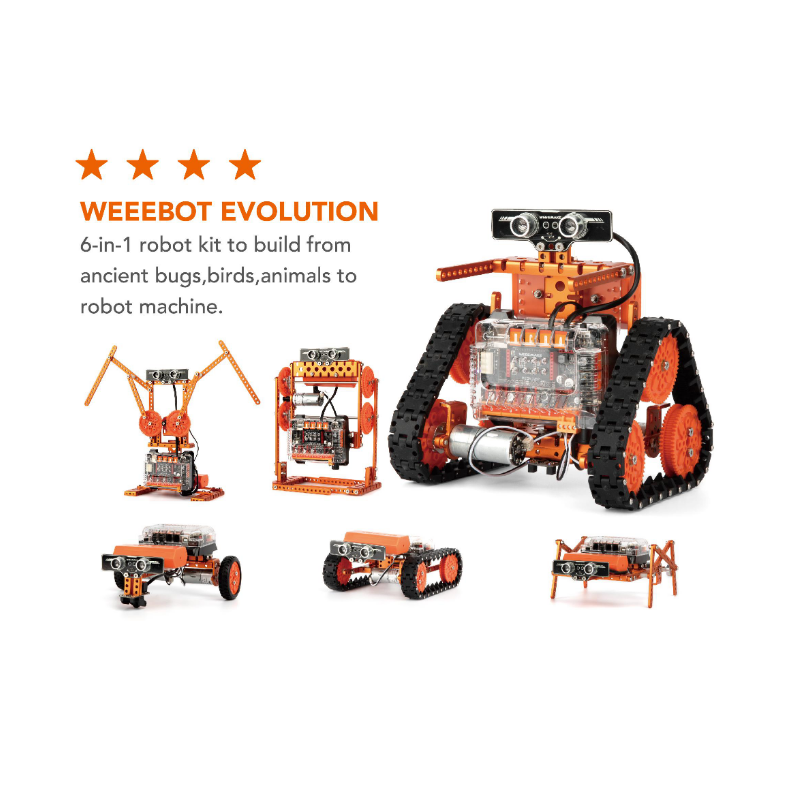
Selecting STEM engineering kits requires looking beyond the physical components to evaluate the underlying ecosystem and operational logistics.
The hardware is only as reliable as the software that commands it. Evaluate the stability of companion applications across all intended operating systems. A kit might work flawlessly on an iPad but suffer from driver issues on a Windows PC or lack support entirely on ChromeOS. Verify cross-platform compatibility before committing to a platform. ChromeOS, for example, handles Bluetooth protocols differently than Windows, which can cause pairing failures if the manufacturer has not optimized their web-based compiler.
Consider the risks associated with cloud-only compilers. Web-based IDEs are convenient because they require no local installation, but they render the hardware useless during internet outages or when institutional firewalls block the domain. Offline IDEs provide stability and ensure the user can code anywhere. The best platforms offer both a web-based interface for quick access and a downloadable offline client for uninterrupted programming.
Understanding the conceptual trade-offs between closed and open ecosystems is necessary for long-term planning. Proprietary hardware offers plug-and-play reliability. Connectors are color-coded, software integration is tested, and troubleshooting is straightforward. However, this convenience comes at the cost of scalability. You are locked into the manufacturer's ecosystem for sensors and upgrades.
Open-source hardware presents a steeper learning curve but offers infinite scalability. Platforms based on open standards allow users to integrate off-the-shelf components. If a user wants to add a specific gas sensor or a custom stepper motor, open-source microcontrollers accommodate it. This flexibility is vital for advanced projects and competitive robotics, where custom fabrication is required.
What works on a single desk often fails in a room of thirty students. When evaluating STEM classroom kits, logistical features become paramount. Stackable storage solutions with clearly labeled compartments are necessary to prevent component mixing between periods. Multi-device Bluetooth pairing is a frequent point of failure. The hardware must support specific channel assignments or secure pairing protocols to prevent interference when twenty robots are activated simultaneously in the same room.
Power management is another logistical factor. Rapid-charge battery hubs that can simultaneously charge multiple lithium-ion packs ensure the hardware is ready for back-to-back classes. Educators must evaluate how long a battery lasts under heavy motor load and how quickly it can be swapped out between sessions.
Institutional environments demand strict adherence to safety regulations. Verify that the hardware carries necessary certifications. CE and FCC marks indicate compliance with electromagnetic interference standards, ensuring the robots do not disrupt other electronic equipment. RoHS certification guarantees the components are free from hazardous materials like lead and cadmium. These certifications are essential indicators of manufacturing quality and user safety.
Hardware without structured pedagogy is just a toy. The educational value of a platform is dictated by the quality of the resources that accompany it.
Many manufacturers use educational standards as marketing terms. Verify if a kit genuinely supports NGSS (Next Generation Science Standards) or CSTA (Computer Science Teachers Association) frameworks. Genuine alignment means the lesson plans explicitly map activities to specific standard codes. For example, a lesson on gear ratios should map directly to NGSS engineering design standards, detailing the specific learning outcomes and assessment methods.
Evaluate the depth of the provided robotics curriculum. Assembly manuals are not lesson plans. A curriculum provides structured, multi-week progression paths. Look for comprehensive educator resources, including grading rubrics, troubleshooting guides for common coding errors, and printable student worksheets. The curriculum should guide the instructor on how to facilitate the lesson, what questions to ask to prompt critical thinking, and how to assess student comprehension beyond simply checking if the robot moves.
Even with high-quality hardware, implementation can fail if common pitfalls are not actively managed.
Avoid kits that offer a highly scripted initial build but lack modularity. These platforms guide the user through a rigid set of instructions to build a single, impressive model. Once completed, the user is left with no clear path for independent experimentation. The hardware sits on a shelf because taking it apart seems destructive rather than creative. Select platforms designed for rapid prototyping, where disassembly is encouraged and rebuilding into new forms is part of the core experience.
Selecting a kit that is too rigidly academic risks alienating users. If the platform feels like a textbook rather than a tool for creation, engagement will plummet. Balance rigorous STEM learning with interactive challenges. Hardware that allows for competitive elements—like robot sumo, line-racing, or obstacle courses—maintains long-term interest. The goal is to disguise complex computational concepts within engaging, goal-oriented challenges.
Lesser-known brands often struggle with long-term software support. Managing firmware updates, dealing with deprecated companion apps, and navigating unresponsive customer support can paralyze an implementation. Research the manufacturer's track record for software updates. A platform that hasn't seen an app update in two years is a major liability. Ensure the manufacturer provides clear documentation, active community forums, and responsive technical support.
In group settings, small components will inevitably go missing. If a kit relies heavily on proprietary modules, a single lost sensor can render the entire robot useless. Mitigate this risk by selecting kits that utilize easily sourced, generic replacement parts. Standardized screws, nuts, and basic structural beams can be replaced from hardware stores. Implement strict inventory management protocols, using tackle boxes or labeled bins to audit parts at the end of every session.
The most effective STEM robot building kit is one that sits slightly above the user's current skill level, aligns with their creator persona, and provides a clear, frustration-free onboarding path. It must challenge them enough to promote growth without causing them to abandon the project entirely. By prioritizing modularity, robust software ecosystems, and clear educational pathways, you ensure the hardware remains a valuable learning tool for years.
To finalize your selection and ensure a successful rollout, follow these exact next steps:
A: A robot toy features closed logic and pre-programmed behaviors. You press a button, and it performs a set action. A STEM robot building kit requires the user to construct the hardware, wire the electronics, and write the code to dictate its actions. Kits focus on open-ended programming, modular hardware, and continuous skill development rather than single-function entertainment.
A: Identify their creator persona and select a kit with heavy mechanical elements. Look for platforms that emphasize structural engineering, featuring extensive gears, axles, linkages, and pneumatics. These kits allow users to explore physical physics and drivetrain mechanics before they are required to engage with complex programming syntax.
A: Yes, quality kits are designed with scaffolded learning. They typically start with block-based visual coding, allowing beginners to grasp logic and sequencing without memorizing syntax. As the user gains confidence, these platforms allow them to transition smoothly into introductory text-based languages, accommodating both beginners and advancing students.
A: Advanced kits for teenagers should support industry-standard text-based languages. Python and C++ are essential for bridging the gap to real-world computer science. For highly advanced students, support for ROS/ROS2 (Robot Operating System) provides exposure to the exact frameworks used in professional engineering and autonomous systems development.
A: Inspect the physical construction for institutional use. Look for high-density ABS plastic, enclosed motor housings, and wire strain relief to prevent cable damage. Ensure the kit includes stackable, compartmentalized storage solutions. Verify that the hardware carries necessary FCC and RoHS certifications to guarantee electromagnetic compliance and material safety.
A: Yes, provided the hardware is designed for modularity. Reusability requires durable connectors that withstand repeated assembly and disassembly without degrading. Avoid kits that rely on single-use adhesives or brittle plastic snaps. Standardized metal fasteners or robust friction-fit pegs are necessary for multi-cohort use across different semesters.
