English
English


Views: 0 Author: Site Editor Publish Time: 2026-07-15 Origin: Site


School districts often face a frustrating procurement dilemma. Legacy interactive whiteboards frequently devolve into expensive projector screens. Teachers simply cast static slides rather than engaging their students. This passivity directly contributes to chronic student disengagement in modern classrooms.
Modern educational environments require a major pedagogical shift. Moving from passive consumption to multi-modal, active interaction is no longer optional. Students need responsive tools. They need systems reacting to their physical inputs in real time. Standard displays simply cannot meet this demand.
We designed this guide to help IT directors and curriculum leaders navigate this hardware transition. You will discover a realistic, evidence-based framework for evaluating modern classroom technology. We will explore practical applications and demonstrate how to measure true educational impact. Ultimately, you will understand how AI interactive displays for student engagement transform daily learning outcomes.
Active Over Passive: AI interactive displays transition classrooms from one-way lectures to bidirectional, individualized learning experiences.
Built-in Cognitive Tools: Edge-AI capabilities enable gesture-based learning and real-time feedback without compromising student data privacy.
Measurable ROI: Success is evaluated not just by hardware longevity, but by quantifiable improvements in classroom participation and differentiated instruction.
Deployment Readiness: Successful adoption requires aligning hardware specifications with robust educator training and strict IT security compliance.
Standard touchscreens struggle to capture sustained student attention. They essentially act as oversized digital whiteboards. Students tap a screen, but the system does not understand instructional intent. This one-way dynamic leads to boredom. Passive displays fail to challenge cognitive pathways. They simply display information without demanding active participation.
Artificial intelligence changes this dynamic entirely. It transitions hardware from a simple input device to a responsive instructional partner. Modern AI systems use adaptive responsiveness and advanced multi-touch tracking. They recognize complex gestures and predict student inputs. The display adapts to student interaction speeds seamlessly. This creates a bidirectional relationship between the learner and the content.
These capabilities align perfectly with established active learning frameworks. Educational psychology emphasizes the importance of immediate feedback. Tactile and visual feedback loops support diverse learning styles effectively. We see distinct advantages for various student profiles:
Kinesthetic Learners: Benefit directly from physical interaction and whole-body movement during lessons.
Visual Learners: Thrive on real-time graphical changes and immediate spatial feedback.
Auditory Learners: Engage deeply through integrated voice cues and adaptive soundscapes accompanying physical actions.
Hardware upgrades must serve a pedagogical purpose. AI transforms the screen from a presentation tool into an active learning environment. Students transition from passive viewers to active participants. They solve problems, manipulate data, and engage physically. This fundamental shift addresses the root causes of classroom disengagement.
Understanding the underlying technology helps schools make informed procurement decisions. Local AI processing drives the modern classroom experience. Edge computing ensures zero-latency interactions. Schools do not need continuous high-bandwidth cloud connections to run complex applications. Everything processes directly on the device motherboard. This eliminates frustrating lag during interactive lessons.
Built-in computer vision facilitates seamless classroom interactions. Spatial tracking monitors physical movement accurately. The display responds intuitively to student presence. Cameras and sensors map the physical space in real time. They interpret hand movements, body positioning, and object placement. This sensory integration creates a fluid interface between the digital and physical worlds.
Classrooms also benefit from smart environmental automation. Integrating a Smart Home Assistant framework tailored for schools changes how educators teach. Teachers can manage lighting, audio, and display settings hands-free. This maintains instructional flow without tethering teachers to a desk. Voice controls allow educators to transition between activities instantly. They keep their attention focused entirely on their students.
Data security matters immensely when deploying these technologies. FERPA and COPPA compliance remain non-negotiable for school districts. We must address privacy by design. Edge computing provides a massive security advantage. AI models process activity data locally on the display. They never store biometric profiles. They never transmit sensitive video feeds to external cloud servers. Students interact freely while administrators maintain strict data compliance.
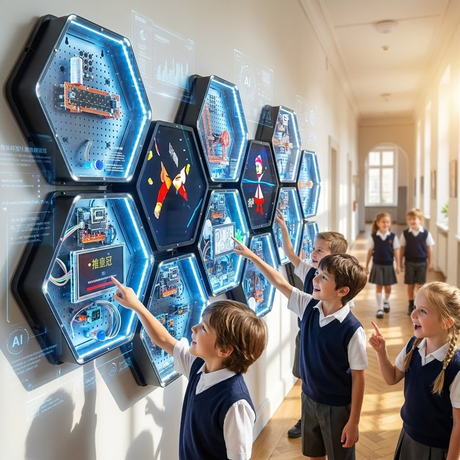
Abstract concepts become physical tasks through intelligent AI modules. Gamification increases motivation naturally. Students use their bodies to solve complex problems. This approach fosters spatial and logical reasoning simultaneously.
Algorithmic thinking requires robust foundational practice. Using a Gesture Control Sokoban Game teaches spatial awareness without traditional controllers. Students physically direct elements on the screen using hand movements. They learn to sequence commands and predict outcomes. This physical engagement anchors abstract coding concepts into muscle memory. It makes computer science principles accessible to younger learners.
Digitizing classic cognitive puzzles offers adaptive challenges. An AI-assisted Hanoi Tower tracks student progress in real time. The display adapts difficulty based on problem-solving speed. If a student struggles, the AI provides subtle visual hints. If a student excels, the system introduces complex constraints. This creates a highly individualized learning experience. It keeps students in their zone of proximal development.
Interactive vision models also connect curriculums to the real world. They ground theoretical lessons in reality. Sustainability education often feels disconnected from daily habits. Utilizing an AI Garbage Recognition module brings these lessons to life. Students hold up physical items to the display’s camera. They learn waste sorting through immediate AI feedback. The system identifies the object and explains proper disposal methods visually. This transforms a standard civic education topic into an engaging, memorable activity.
We must establish better metrics for healthy, productive engagement. Passive screen time provides zero educational value. We measure collaborative multi-user touch sessions instead. Active participation rates reveal true learning dynamics. We analyze how often students interact directly with the content.
AI analytics help educators identify struggling students quickly. Teachers track interaction times and specific error rates. The system flags core concepts needing reinforcement. This data enables highly differentiated instruction. Educators can group students based on actual performance metrics rather than assumptions. They intervene before a student falls irreparably behind.
District leaders must connect display deployments to broader educational goals. Educational return on investment appears in specific classroom metrics. Engaged students disrupt class less frequently. They retain knowledge better over time.
Metric Category | Traditional Display Monitoring | AI-Driven Active Assessment |
|---|---|---|
Student Engagement | General device uptime and screen-on duration. | Multi-point touch frequency and gesture completion rates. |
Comprehension | End-of-unit standardized test scores. | Real-time error rate tracking during interactive modules. |
Pacing | Teacher intuition regarding class speed. | Algorithmic difficulty adaptation based on response times. |
Behavioral Impact | Manual discipline referral counting. | Increased collaborative time leading to fewer off-task disruptions. |
This localized data validates the initial hardware investment. Improved formative assessment scores demonstrate clear pedagogical value. When students receive immediate feedback, their confidence grows. When teachers receive actionable analytics, their lesson planning improves.

Successful deployments require meticulous IT planning. Network requirements dictate overall deployment strategies. Integrating displays with Mobile Device Management (MDM) platforms ensures unified control. IT teams must establish clear hardware lifecycle expectations early. They must govern application access centrally. This prevents rogue software installations and maintains network integrity.
Common friction points threaten successful adoption rates. Software ecosystem incompatibility causes endless frustration. Overwhelming teachers with complex interfaces leads to immediate abandonment. IT departments must simplify the user experience aggressively. They should pre-configure popular educational applications. The hardware must work seamlessly the moment it powers on.
Hardware success hinges entirely on comprehensive pedagogical training. You cannot simply mount a display and expect instructional miracles. A phased rollout strategy works best for school districts. Educators need time to integrate AI tools into their lesson plans gradually.
Familiarization Phase: Teachers use the display as a standard digital whiteboard to build basic comfort.
Module Integration: Educators introduce simple pre-built AI modules, like gesture-based games, into weekly lesson plans.
Data Utilization: Teachers begin analyzing built-in engagement metrics to adjust their instructional pacing.
Advanced Workflow: Staff fully integrates environmental controls and adaptive cognitive tools into daily routines.
Ongoing professional development ensures long-term utilization. Peer-led workshops provide the most effective training. Tech-forward teachers should mentor their colleagues. Sharing successful lesson templates accelerates district-wide adoption.
Decision-makers must prioritize features-to-outcomes strictly. Does the gesture control actually solve a teaching problem? Or is it merely a gimmick? Establish strict success criteria before initiating the purchasing process. Hardware must support your specific curriculum standards.
Ask manufacturers difficult, highly specific questions. Scrutinize their software subscription models thoroughly. Demand clear answers about ongoing firmware update frequency. Ensure absolute interoperability with your existing Learning Management Systems (LMS). Ecosystem lock-in drains district budgets over time. You need open architectures supporting diverse educational software.
Evaluation Pillar | Critical Vendor Questions to Ask |
|---|---|
Privacy & Security | Does the AI process vision data locally, or does it transmit feeds to the cloud? |
Interoperability | Will this hardware integrate natively with Canvas, Google Classroom, and our current MDM? |
Software Licensing | Are core AI features included in perpetuity, or do they require recurring annual subscriptions? |
Training Support | Do you provide on-site pedagogical training for educators, or just technical manuals for IT? |
Initiate a localized pilot program before committing massive funds. Select a small cohort of tech-forward educators. Deploy the displays in their classrooms for one full semester. Establish baseline engagement metrics before scaling district-wide. Gather qualitative feedback regarding interface usability. This cautious approach minimizes disruption and proves actual educational value.
AI interactive displays for student engagement represent essential pedagogical infrastructure. They are not merely iterative hardware upgrades. They transform passive learning environments into dynamic, bidirectional ecosystems. By leveraging edge computing and computer vision, schools provide individualized, real-time feedback to every learner.
Districts must balance innovative features with strict data security. Prioritize local processing and intuitive interfaces. Support your educators through phased rollouts and ongoing professional development. Technology only succeeds when teachers feel confident utilizing it.
Take proactive steps toward modernizing your classrooms today. Request specialized technical demos from leading hardware vendors. Consult with implementation specialists to map these specific AI features directly to your district curriculum needs. Launch a localized pilot program to measure the immediate impact on your students.
A: No. Modern classroom displays prioritize privacy through edge computing. They process activity data and computer vision inputs locally on the device motherboard. They never store biometric profiles or upload student video feeds to external cloud servers. This architecture ensures strict adherence to FERPA and COPPA compliance standards.
A: The transition remains highly intuitive. Top-tier displays feature clean user interfaces and pre-built interactive modules. However, vendor-provided professional development is absolutely necessary. Proper training helps educators confidently shift from simply casting static slides to facilitating active, multi-modal learning experiences seamlessly.
A: Yes. Reputable interactive panels utilize open architectures and agnostic software environments. They include standard connectivity ports and offer seamless interoperability with major Learning Management Systems. This open approach prevents expensive ecosystem lock-in and significantly simplifies daily IT administration tasks.
A: Absolutely. Gesture control provides significant utility beyond mere novelty. It offers essential accessibility for younger students developing physical motor skills. It also heavily supports special education needs. It allows physical interaction without requiring precise fine-motor stylus control, making daily learning highly inclusive.